A whole sampler, sequencer and FX box in one hand. Standalone.
Teenage Engineering PO-33 K.O!
The goal this session
Sample our own sounds into the PO-33, sequence them into a 16-step pattern, and perform it — all on one tiny battery-powered box.
What we need on the desk
This is a side session — the first step beyond the core five, and a complete
change of pace. The PO-33 K.O! is an entire sampler, sequencer and effects box
that fits in one hand. Nothing else is needed: it has its own microphone, its own
little speaker, and runs on two AAA batteries. In this session we record our own
sounds, turn them into a beat, and jam — all on this one tiny device.
It works as a standalone — the core sessions aren’t required. But it’s a lovely
break from the bigger setup, and the instincts carry straight across.
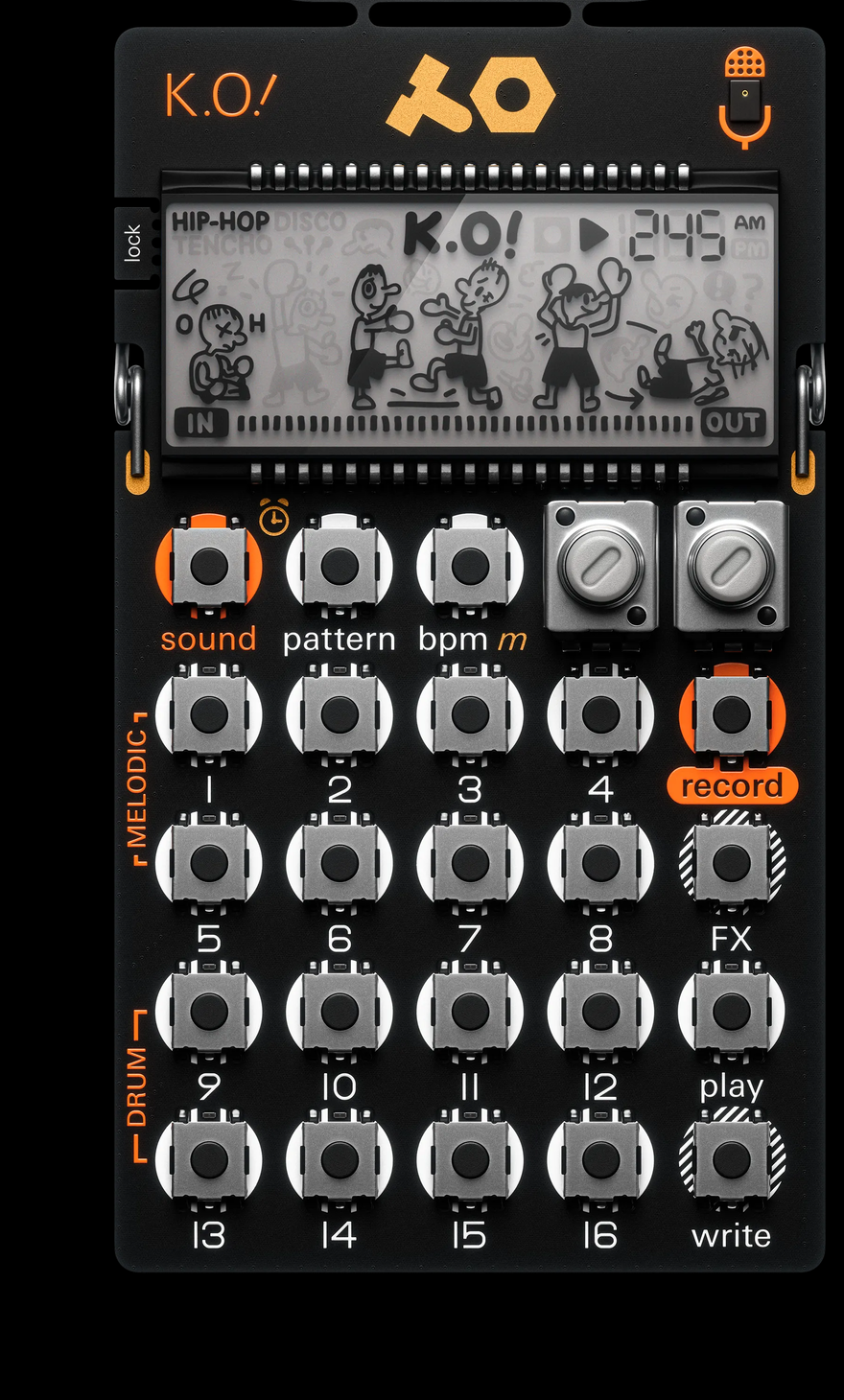
The real PO-33 K.O! layout: the two knobs and the sound / pattern / bpm buttons sit along the top; keys 1–8 are MELODIC and 9–16 are DRUM; record, FX, play and write run down the right-hand column. · Photo: Teenage Engineering
Part A — Power on and make a sound (about 10 min)
Put in the batteries
Insert two AAA batteries, minding the + and − ends. The PO-33 powers on by
itself — there’s no on/off switch. The screen shows a little clock.
Set the volume
Hold bpm and tap a numbered key from 1 to 16 —
that key number sets the output volume. Start gentle at key 4, then raise
it to taste.
Hear what's in the slots
Hold sound and tap key 1 to land on the first
sound, then tap keys 1–16 to play it. Now hold sound
and tap key 9 and play keys 9–16. Some slots may already hold sounds;
empty ones are silent — those are the ones we’ll record into next.
Press play. On a brand-new PO-33 a beat starts — one
we didn’t make. The device ships with a handful of factory sounds and demo
patterns, and play simply starts whichever pattern
is loaded. Press play again to stop it.
Notice it keeps looping on its own — tapping keys or selecting sounds doesn’t
start or stop it. That little loop is the sequencer at work. The next
section explains exactly what’s happening, and later we’ll clear this demo and
build our own.
How the PO-33 thinks (about 10 min)
Before building a beat, it’s worth picturing what’s going on inside — because the
PO-33 is really two machines sharing one set of keys, and mixing them up is
the single biggest source of “wait, why is it doing that?”
Two machines: the instruments and the sequencer
The instruments — 16 sounds. Each numbered key holds a sound. Tapping a
key plays that sound right now, by hand, like hitting a drum. Nothing is
recorded — it’s just a noise on demand.
The sequencer — the pattern. A saved loop that taps those sounds for us,
automatically, over and over.
Pressing play starts the sequencer; pressing it again
stops it. The pattern runs entirely on its own. Choosing a sound
(sound + a key), or choosing none at all, only changes
which instrument our own taps will play — it never starts, stops, or changes
the running loop.
The words: sequencer, step, loop, pattern
These four terms describe one simple machine. In plain language:
Step — the PO-33 chops one bar of music into 16 equal slots called
steps, laid out across the 16 numbered keys. Picture 16 little boxes in a row;
each box is one moment in time. A box either holds a hit (a sound fires
there) or sits empty (silence).
Loop — it plays those 16 steps left to right, then jumps back to step 1 and
goes again, forever, until stopped. That endless once-through is the loop. One
trip through all 16 steps is one bar.
Playhead — while it loops, an unseen cursor sweeps across the 16 steps in
time with the beat. Whenever it lands on a step that holds a hit, that sound
fires.
Sequencer — the machine that does all of the above for us. Instead of
tapping a sound by hand over and over, the sequencer remembers where the hits
go and plays them on repeat.
Pattern — one filled-in 16-step grid: which sounds fire on which steps. The
PO-33 holds many patterns; we build them one at a time and can chain them into
a song later.
Each sound has its own lane
Here’s the part that answers “how do I get a specific sound onto a specific
step”: every sound has its own on/off across the 16 steps — its own lane.
All the lanes share the same 16 keys, but only one shows at a time. While
building a pattern, the lit keys show the steps of whichever sound is currently
selected; select a different sound and the lights switch to show that sound’s
steps. So a beat is built one sound at a time — select the kick and mark where it
hits, select the snare and mark where it hits, and so on. There’s only one
pattern grid here; the PO-33 has no separate side-by-side tracks like a bigger
groovebox.
The whole picture, nested
Zoom out and it’s boxes inside boxes — far fewer than the Digitakt. From the
outside in:
Memory — one shared pool of 40 seconds of recording time, kept inside
the device. No card, no computer.
Sound slots — 16 of them, split in two:
Melodic (keys 1–8) — the recorded sample is spread across the keys as a
scale, so each key plays the whole sound at a different pitch.
Drum (keys 9–16) — the sample is sliced, so each key fires a different
piece of it — one hit per key.
Pattern — the 16-step loop from above. It points at the sound slots; it
doesn’t store the audio itself.
Pattern chain — patterns played back-to-back as a song, up to 128 in a
row.
How it nests: one 40-second memory pool holds 16 sound slots (8 melodic, 8 drum); patterns are 16 steps that point at those slots; patterns chain into a song.
Where these live — and the one big gotcha
Thing
Where it lives
If it changes
Sound (a sample)
one of 16 slots in the shared 40 s memory
re-sampling or editing a slot changes every pattern that uses it
Pattern (16 steps)
in the device; it points at slots, not audio
—
Everything
saved automatically when the device powers down
pulling the batteries right after recording can lose recent work
Hold recordand hold a destination key: pick a
key 1–8 for a melodic sound or 9–16 for a drum sound. The mic records
for as long as the keys are held — release to stop. The screen counts down the
seconds left in the 40-second pool, so keep takes short.
A good first pass: hum or sing a steady note into a melodic slot (1–8),
and tap a tabletop or clap into a couple of drum slots (9–16).
Plug a 3.5 mm cable from a sound source — a phone, or the Kawai’s output —
into the PO-33’s line-in jack. With a cable inserted, it records from
line-in instead of the mic. Then sample exactly as before:
record + a destination key while the sound plays.
Trim the sample — on the FX parameter pages
A fresh sample usually has a little silence at the front or a long tail. We
tidy that on the sound’s parameter pages. First select the sound to edit:
sound + its key.
Now the part that isn’t obvious. With a sound selected and the pattern not
playing, fx doesn’t add effects — it steps through
that sound’s parameter pages. Tap fx to cycle
tone → filter → trim (the screen names the page it lands on). Stop on
trim, then turn A to set where the sound starts
and B to set its length. The sample re-triggers as
the knobs move, so the edit can be heard while it’s made.
🔊 Expected result — a clean, trimmed one-shot
Reference clip not recorded yet — capture this and save it under public/audio/, then add src="/audio/…".
⚠️ If the sound starts late or has a long silent tail, nudge knob A (start) and knob B (length) until it triggers tight.
Now we put the sequencer to work. The idea from the last section in one line: in
write mode the numbered keys stop being instruments and become the 16
steps of the pattern — we draw the beat instead of playing it — and each
sound has its own lane, so we build it one sound at a time.
Start from a clean slate
If a demo beat is still looping, stop it with play,
then empty the pattern: hold record +
pattern to clear the active pattern. Now the 16
steps are blank and waiting for our own sounds.
Pick the sound to place
Hold sound and tap the key of the sound to sequence
first — a kick-like drum slot (keys 9–16) is a good start. This chooses
whose lane we’re about to draw: everything we mark next lands on this
sound’s 16 steps, until we pick another sound.
Turn on write mode and place steps
Press write to enter write mode. The 16 numbered
keys now stand for the 16 steps of the bar, not for playing the sound. Tap
a key to switch that step on for the selected sound — it lights up,
meaning “fire this sound here.” Tap a lit step again to switch it off.
For a steady four-to-the-floor kick, light up steps 1, 5, 9 and 13. Press
play to hear the loop while editing — the pattern
cycles and each lit step fires as the playhead passes it.
Prefer to play by feel? Start the loop with play,
then holdwrite and tap the sound’s key in time
with the beat. Each tap is recorded onto the nearest step (snapped to the
grid, following the swing setting), so it stays in time even when our timing
is loose. Both ways write to the same lane — whichever feels natural.
Read the lights, fix mistakes
In write mode the lit keys always show the selected sound’s lane — the
steps where it fires. Tapped a step by accident? Tap the lit step again to
clear it (the same on/off toggle as the Digitakt grid). Switch the view to a
different sound’s lane any time with sound + its key.
Set the tempo
Press bpm to step through the tempo presets. For an
exact tempo, hold bpm and turn B
(60–240 BPM); hold bpm and turn A
to add swing.
Select another sound (sound + its key). Its lane
appears on the keys — empty at first — and we draw or tap in its steps the
same way over the same loop. Build it like a drum loop: something steady on the
beat, something on the offbeats, one bit of character. Each sound keeps its own
lane; together they make the pattern.
🔊 Expected result — a looping 16-step beat from our own samples
Reference clip not recorded yet — capture this and save it under public/audio/, then add src="/audio/…".
⚠️ No single sound should dominate. Re-trim or re-pitch a slot if a part is poking out.
Part D — Perform, then let it save (about 15 min)
Punch in effects
While the pattern plays, hold fx and tap a key 1–15
— the effect lasts only while held, like a punch-in. To bake an effect into the
pattern, turn write on first, then apply it; to clear
saved effects, hold fx + key 16 with write on.
Make a second pattern: hold pattern + an empty key,
then write a new loop into it. To play patterns in
order, hold pattern and tap the pattern keys one after
another — up to 128 in a chain, repeats allowed.
There’s no save button. The PO-33 writes everything to memory when it
auto-powers-off after a few idle minutes. Before swapping batteries or packing
it away, let it settle so the latest sounds and patterns are safely stored.
That’s a whole track — sampled, sequenced and performed — on one box that fits in
a pocket. The instincts behind it (a sample, a step, a pattern that points at
sounds) are exactly the ones from the Digitakt sessions, just shrunk down. The
other gear waiting in the wings — the Bestie mixer, the Chase Bliss pedals, the
PO-32 — slots in from here the same way: one device, one job, at a time.
What we just learned
What a sequencer, step, loop and pattern actually are
How the PO-33 is organized — one memory pool, 16 sound slots, patterns, chains
The difference between playing a sound by hand and recording it into the pattern
How to record sounds from the built-in mic and from line-in
The difference between melodic sounds (a scale) and drum sounds (slices)
How to sequence a 16-step pattern — drawing steps and tapping them in live
How to set tempo, punch in effects, and chain patterns into a song
Why sounds are shared — and how that helps and bites